
Donations help
How donations work on Rallee
Donations on Rallee are processed by our partner, Pledge. Rallee charges a 0% platform fee, and Pledge's processor, Stripe, charges 2.9% + $0.30 per donation. The beneficiary sets up a free Pledge account to receive payouts in their bank account, and only the beneficiary can issue refunds.
I'm receiving donations
I'm giving
About our donations partner
Donations are powered by Pledge
Rallee partners with Pledge to process every donation. Rallee does not process donations, hold funds, or act as a payment processor, and we don't have access to the beneficiary's Pledge account.
Encrypted data
Donor, payment and private information is protected by industry-standard SSL and encrypted in transit and at rest.9
Fraud detection
Pledge's internal fraud detection proactively flags suspicious transactions.9
Crowdfunds reviewed
Pledge's trust and safety team reviews crowdfunds and suspends those that appear to be scams or illegal.9
Read more in Pledge's Trust & Safety center.
Fees
What does it cost?
Rallee doesn't take a cut of donations. The only deduction is the card processing fee.
- Rallee platform fee on donations
- 0%
Example from Pledge: someone gives $100 and adds a $10 tip. Their card is charged $110. The 2.9% plus $0.30 fee comes out of the $100, and the beneficiary receives $96.80 in their bank account.1
For organizers, recipients and beneficiaries
How do I set up crowdfunding in Rallee?
Donations are one of the ways to help you can add to a Rallee. Organizers and recipients can turn them on while creating the Rallee or at any time after.
Step 1: Open Ways to help
On your Rallee, click Manage this Rallee, then Ways to help.
Creating a new Rallee? Choose Donations on the How can people help? step.
Step 2: Choose Donations
Click the Donations tile. If donations are already on, click Manage, then Edit.
Step 3: Fill in the details
- Goal donation amount (optional): between $100 and $1,000,000.
- How will these donations help? (optional): a line or two for your supporters.
- Beneficiary first name, last name and email: the person who will receive the money in their bank account.
- Confirm beneficiary email: type it again.
Step 4: Finish, and people can give right away
Participants can donate as soon as you finish. The beneficiary gets an email from Pledge to set up their account and receive the money. It can take a couple of minutes for new donations to appear on the Rallee.
Who should the beneficiary be?
The person who will receive the money. Pledge requires that they:
- Are at least 18 years old
- Have a Social Security number
- Have a US-based bank account
Before a payout, Pledge asks the beneficiary for their full legal name, address, date of birth, the last four digits of their Social Security number and their bank details.7
Choosing someone as the beneficiary doesn't give you access to the money. Only the beneficiary can reach it, through their own Pledge account.
Keep the same beneficiary email
Changing the beneficiary email later creates a brand new fundraiser. If a Pledge account can't be set up with the original email, the donations made so far are refunded. To change the beneficiary's name or details, keep the email and update them inside Pledge instead. Pledge can't move donations from the old fundraiser to the new one.4
For organizers, recipients and beneficiaries
How do I get payouts from Rallee?
Rallee never holds the money. Donations go through our partner, Pledge, and the beneficiary receives them by setting up a free Pledge account. Here's how, step by step.
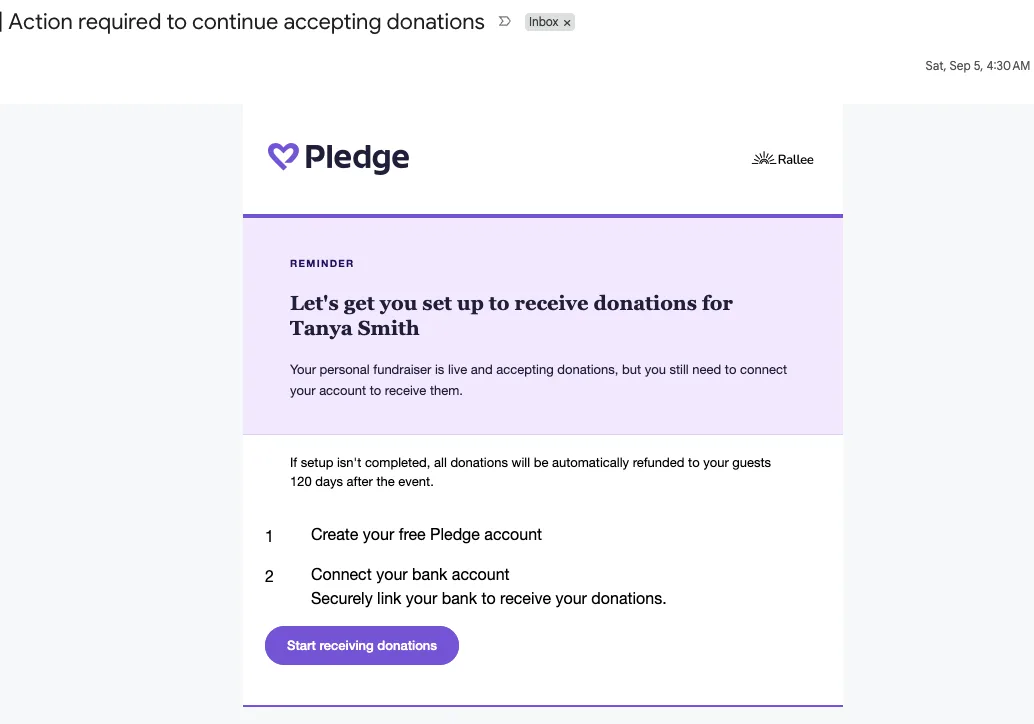
Step 1: Click “Start receiving donations” in the Pledge email
Pledge sends this email to the beneficiary email set in the Rallee's donation settings. Use that same email to create your Pledge account.
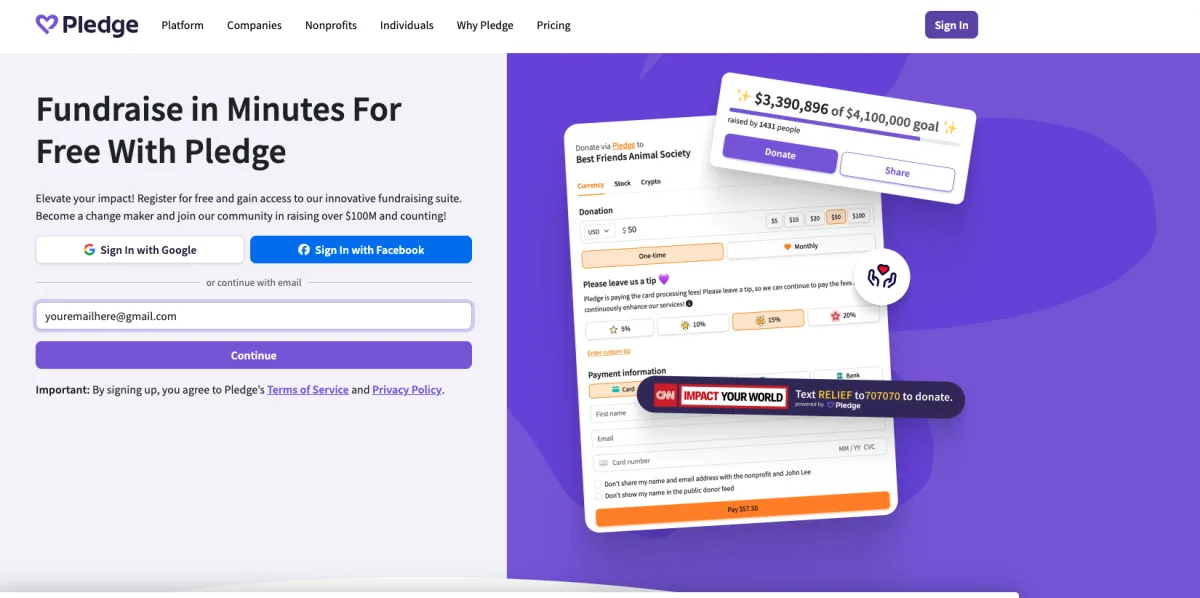
Step 2: Create your Pledge account
Sign up with the email address the Pledge email was sent to, then click Continue and follow the steps.
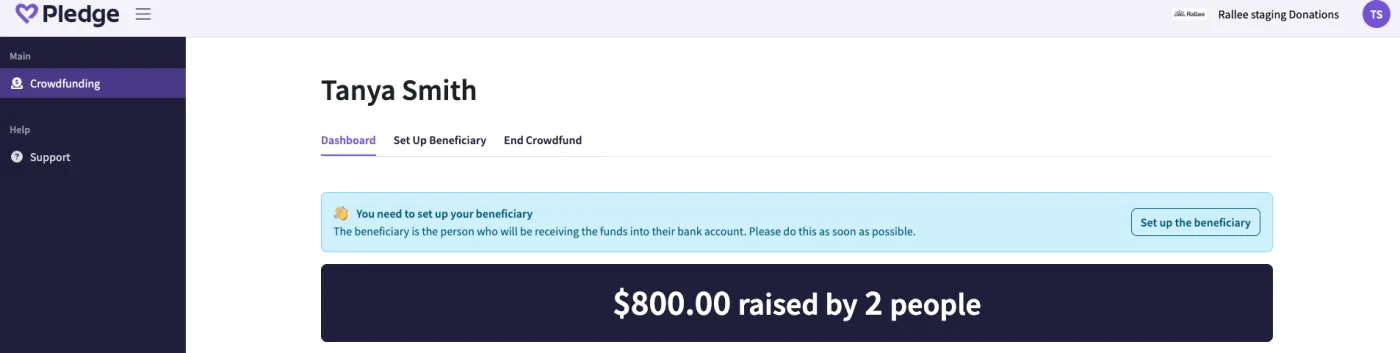
Step 3: Click “Set up the beneficiary”
Your Pledge dashboard shows the total raised. To receive it, set up the beneficiary details and bank information.
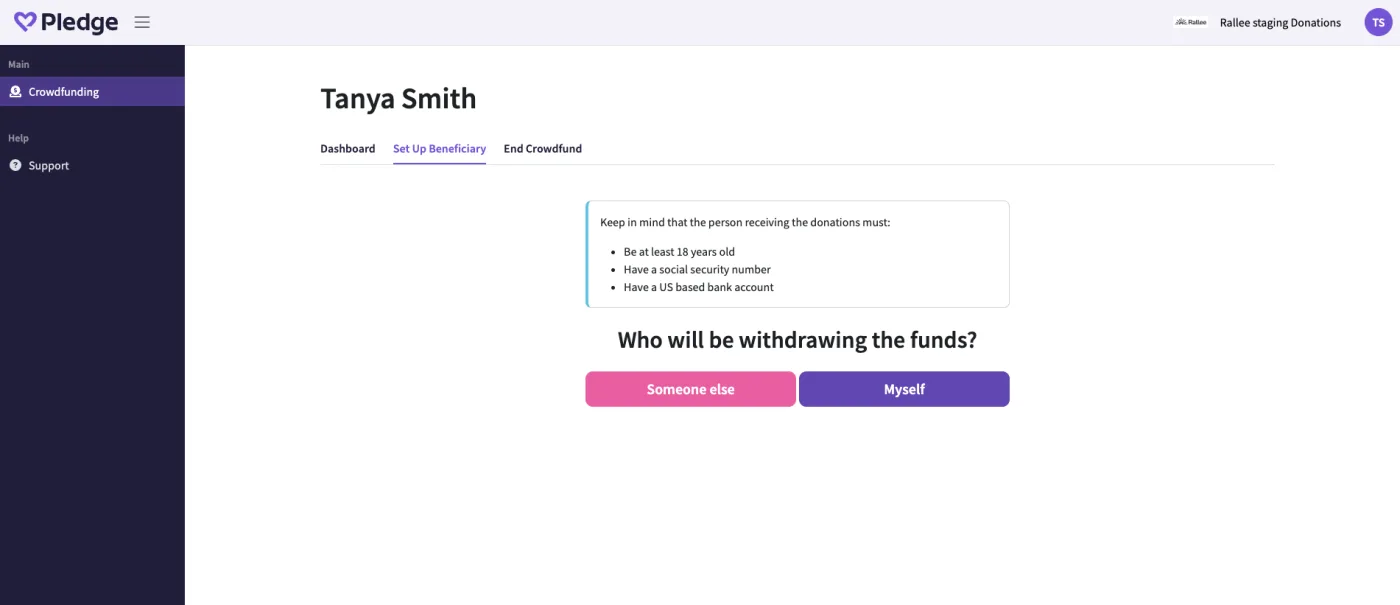
Step 4: Select “Myself”
Choose Myself if you are the beneficiary and the money will go into your bank account.
If you choose Someone else, that person has to sign in to their own Pledge account and add their own personal and bank information.7
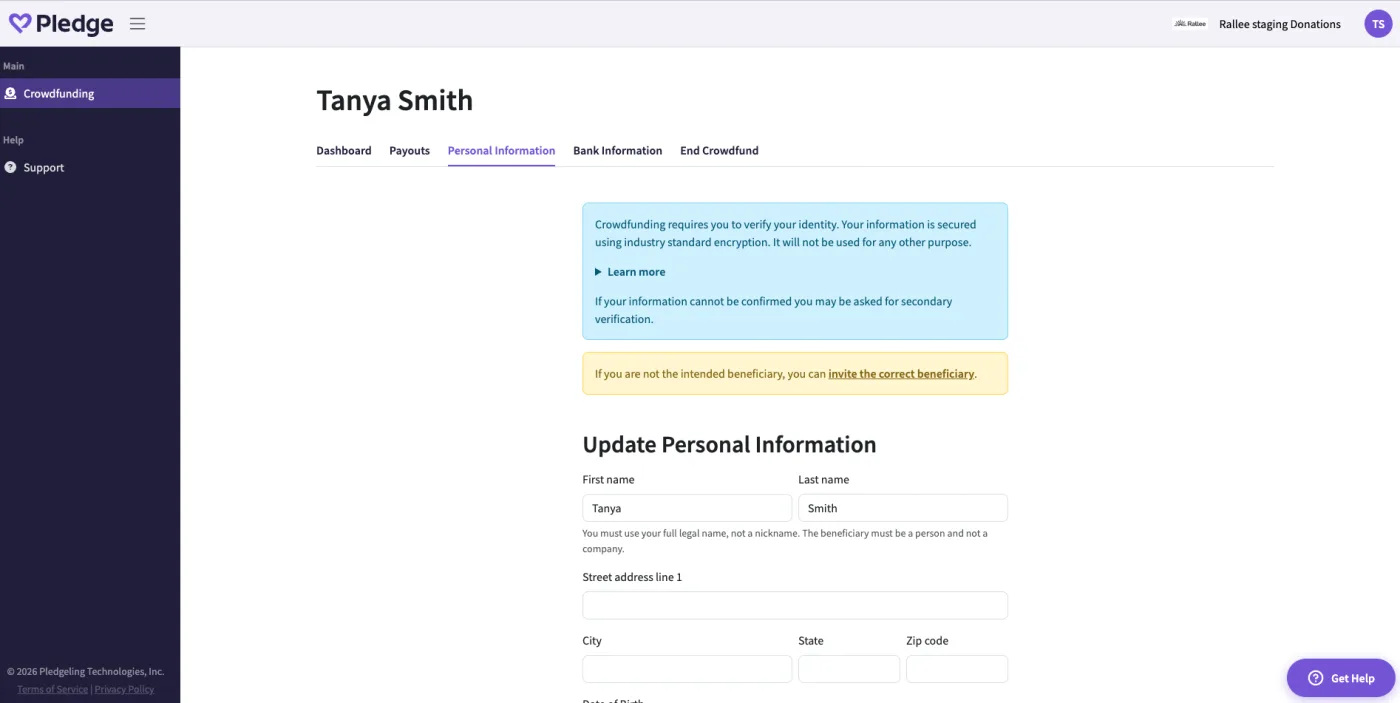
Step 5: Fill out your personal information
Enter your full legal name (not a nickname), address, date of birth and the last four digits of your Social Security number. If your information can't be confirmed, Pledge may ask for secondary verification.7
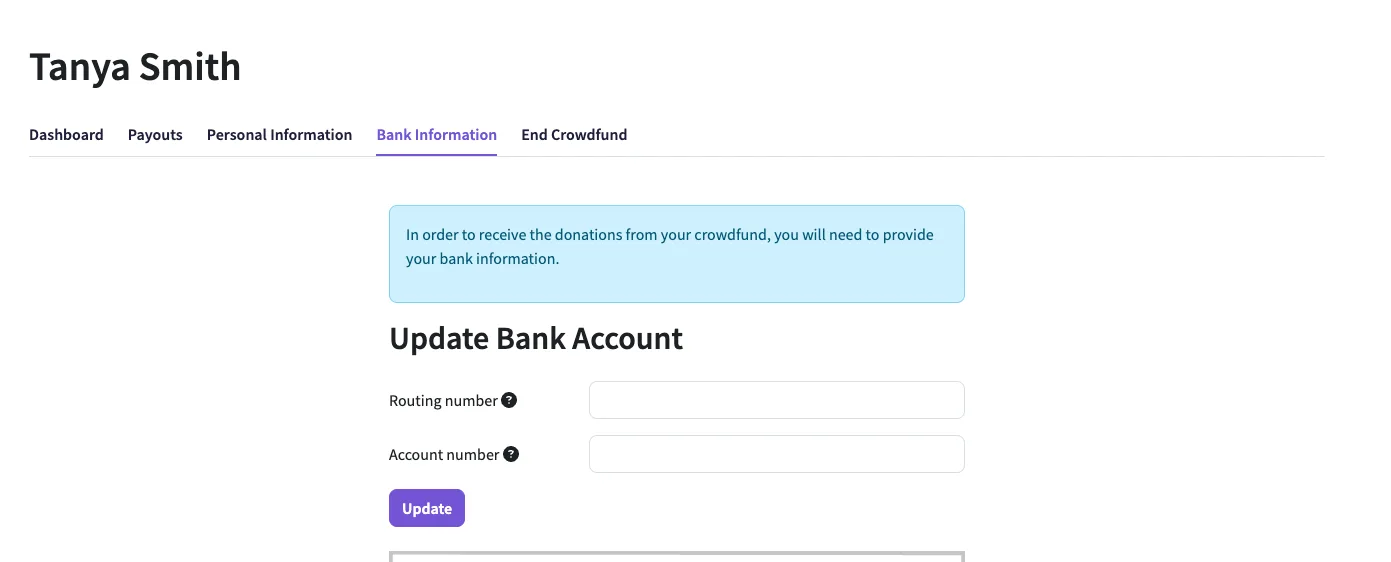
Step 6: Add your bank information
Enter your routing number and account number, then click Update. This is the last step. Payouts go straight to your bank account.7
When will the money arrive?
Once your account is set up and your bank is verified, the first payout arrives 7 to 10 business days after the first donation. After that, each payout arrives 7 business days after the donation. See payout status in the Payouts tab.2
Can't find the Pledge email?
Check spam and junk. Or go to pledge.to/signin, enter the beneficiary email, click forgot your password?, and follow the link to set a password.4
Need to change your bank?
In Pledge, open the Bank Information tab and enter the new routing and account numbers. A payout already in transit still goes to the old account.5
Finish setup as soon as you can
Donations are accepted right away, but the beneficiary has to finish Pledge setup to receive them. The Pledge email explains that if setup isn't completed, donations are automatically refunded to the donors.7
For organizers, recipients and beneficiaries
How do I refund people on Rallee?
Rallee does not access financial data of users and cannot issue refunds on your behalf. The beneficiary refunds a donation from their Pledge dashboard.
Step 1: Get the refund request
When a donor asks for a refund on the Rallee, the beneficiary gets an email with their request.
Step 2: Sign in to Pledge
Go to pledge.to/signin and open your dashboard.6
Step 3: Click the red refund button
Find the donation in your list. There is a red refund button to the right of each donation.3
No refund button?
The donation has already been paid out to the beneficiary and can't be refunded through the dashboard. The beneficiary will need to pay the donor back personally.3
For donors
How do I get a refund for my donation?
Only the beneficiary can refund a donation. Rallee does not have access to financial data and cannot edit, refund, or alter donations made through Pledge. You can request a refund on Rallee in one click. This will send the beneficiary an email requesting a refund.
Step 1: Find your donation
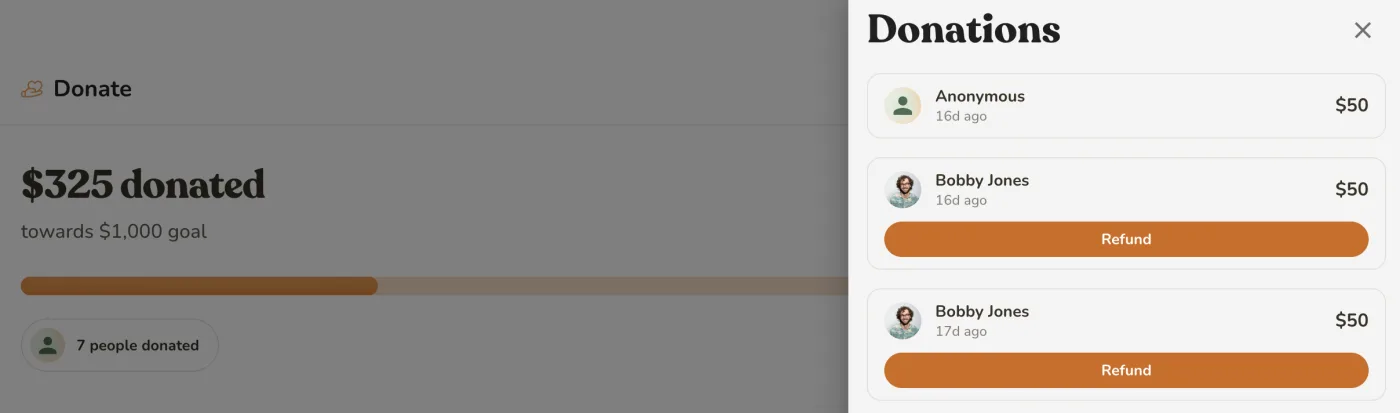
Sign in to Rallee and open the Rallee you gave to. In the Donate section, click View all. You must be signed in to Rallee to see the donation refund button.
Step 2: Click Refund, then Confirm
Your own donations have a Refund button. Click it, then Confirm.
We email the beneficiary about your request, and the button changes to Refund requested. The beneficiary decides whether to refund it in their Pledge account.
No Refund button, or need more help?
Anonymous donations don't show a Refund button, because they aren't linked to your Rallee account. For these, or for any other payment question, contact Pledge:
For donors
How do I make my gift anonymous?
You choose this at checkout, before you pay.
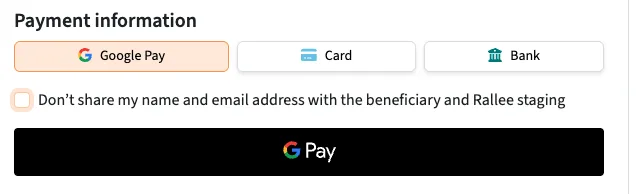
Step 1: Check the box at checkout
Under Payment information, check Don't share my name and email address with the beneficiary and Rallee, then pay.
Your gift shows as Anonymous in the Rallee's donation list, and the beneficiary won't see your name in Pledge either.6
Good to know
Because an anonymous gift isn't linked to your Rallee account, you can't request a refund for it from the Rallee. Contact Pledge instead.
FAQ
Donation questions
Rallee has a 0% platform fee for donations. Through our partner, Pledge, we offer the option to add an optional tip to your donation. That tip helps us continue to provide this secure service to our users. Pledge's processor, Stripe, charges a credit card processing fee of 2.9% + 0.30 on each credit card donation. For questions regarding Pledge, please see their FAQs here or submit a ticket to Pledge here.1
Rallee never holds the money. Donations are processed by our partner, Pledge. The beneficiary assigned to the donations receives an email from Pledge to set up an account, and withdrawals are made from inside that account. If the email never arrived, check the email address for the beneficiary. You can find this section by clicking the Manage this Rallee button, then clicking Ways to Help, then selecting "Donations." For questions regarding Pledge, please see their FAQs here or submit a ticket to Pledge here.72
A donation beneficiary's first name, last name, and email will be assigned by the organizer, co-organizer, or recipient of a Rallee that includes donations as an option of support. That beneficiary will receive an email from our donation partner, Pledge, to set up an account and withdraw your funds. Please note that Rallee does not process your donation, hold funds, or act as a payment processor, and we do not have access to your Pledge account. For questions regarding Pledge, please see their FAQs here or submit a ticket to Pledge here.7
Only the assigned beneficiary in the Donations section in Ways to Help. Our partner, Pledge manages the payouts and the funds in the Pledge account are accessed only by the assigned beneficiary. An organizer or recipient chooses who that beneficiary is when donations are set up, but choosing them does not grant access to the funds. The beneficiary has to create a Pledge account. Details are emailed to the beneficiary. Rallee has no access to the donations. For questions regarding Pledge, please see their FAQs here or submit a ticket to Pledge here.6
Open Manage this Rallee, go to Ways to help, and open Donations. You can change the goal and the description of how donations will help. If you would like to change the beneficiary email, please note that changing it creates a brand new fundraiser. We strongly recommend keeping the existing email and updating the beneficiary's details inside Pledge instead. For questions regarding Pledge, please see their FAQs here or submit a ticket to Pledge here.4
Refunds are started by the donor, not by you. In the Donations section they open their own donation and use the refund button, which emails a refund request to the beneficiary. Rallee cannot issue refunds directly. The beneficiary completes the refund inside their Pledge account. A user can also request a refund from the Rallee page, which sends you a refund request. If you would like to honor this request, then visit your Pledge account, find the donation, and click refund. For information on how beneficiaries can refund donations, see here. For questions regarding Pledge, please see their FAQs here or submit a ticket to Pledge here.3
If you have donated to someone in Rallee and would like to request a refund, go to the Donate section in the Rallee and click View all. Click the Refund button on your donation, then click Confirm to send a refund request email to the beneficiary of the donations in that Rallee. Please note that refunds are handled directly by the donation beneficiary. Rallee cannot issue a refund on your donation, all refunds are subject to the beneficiary taking action in their Pledge account. For information on how beneficiaries can refund donations, see here. For questions regarding Pledge, please see their FAQs here or submit a ticket to Pledge here.3
For questions regarding Pledge, please see their FAQs here or submit a ticket to Pledge here.8
Yes, you can donate to individuals on Rallee. We use Pledge to facilitate secure donations. Once you assign a beneficiary in Rallee, that beneficiary will receive an email from Pledge to manage the donations and withdraw their funds. For questions regarding Pledge, please see their FAQs here or submit a ticket to Pledge here.7
Still stuck?
Get help
Contact Rallee
Questions about donations on Rallee? Contact us
Pledge Help Center
Pledge's answers on setup, payouts and refunds. Read the articles8
Ticket to Pledge
For payment and account questions only Pledge can answer. Submit a ticket
Sources (9)
Pledge Help Center. Personal Fundraisers (Crowdfund): What are the costs of using personal fundraisers (crowdfund)?
help.pledgeling.comRetrieved 23 Sep 2026Pledge Help Center. Personal Fundraisers (Crowdfund): When will I receive payments?
help.pledgeling.comRetrieved 23 Sep 2026Pledge Help Center. Personal Fundraisers (Crowdfund): Refunding an individual donation
help.pledgeling.comRetrieved 23 Sep 2026Pledge Help Center. Completing personal fundraiser (crowdfund) setup if you can't find the email with the instructions
help.pledgeling.comRetrieved 23 Sep 2026Pledge Help Center. Changing a Personal Fundraiser's (Crowdfund) bank account
help.pledgeling.comRetrieved 23 Sep 2026Pledge Help Center. Personal Fundraisers (Crowdfund): How do I see who donated?
help.pledgeling.comRetrieved 23 Sep 2026Pledge Help Center. Setting up a Personal Fundraiser (Crowdfund)
help.pledgeling.comRetrieved 23 Sep 2026
We use cookies and local storage to enhance your experience, analyze site usage, and remember your preferences.
By clicking "Accept", you consent to our use of cookies and storage. Learn more