
Meal train apps
The best meal train apps, compared
The best free meal train apps are Rallee, MealTrain, and Take Them A Meal. All handle meal scheduling, but Rallee is completely free and lets you add gift cards, rides, errands, donations and any other way to help alongside meals, so you can care for a loved one however they need.
Free, no ads, no upgrade to pay for. Takes under 1 minute.

Side by side
How the top meal train apps compare
Compare tools to see which is right for youComparison verified September 17, 2026 against each provider's own website.
| Feature | Rallee | MealTrain | Take Them A Meal |
|---|---|---|---|
| Free to create a page | Free | Free, $10 upgrade | Free |
| Volunteer meal calendar | Yes | Yes | Yes |
| Help beyond meals: rides, errands, childcare | Unlimited | Paid upgrade | Meals only |
| Share updates with everyone at once | Yes | Yes | Meals only |
| Embedded gift card marketplace | Yes | No | Own meals only |
| Embedded donations | Yes | Yes | No |
| Donation fees | 2.9% + $0.30 | 7.9% + $0.30 | N/A |
"Embedded gift card marketplace" means supporters browse and buy on the page itself. CaringBridge and MealTrain hand off to InComm's TheGiftCardShop instead, which is why both show no here: MealTrain's own help centre states it "does not actually sell gift cards". "Embedded donations" means supporters give on the page itself. Give InKind, Take Them A Meal and Lotsa Helping Hands do not, so no donation fee applies to them; Give InKind families can link out to an existing GoFundMe, PayPal, Venmo or CashApp instead. Fees shown are what comes out of a donation before it reaches the recipient.
The short answer
Which meal train app is right for you?
Choose which meal train site is right for your situation.
Best free all-around meal train app
Rallee
A meal calendar plus optional rides, errands, gift cards and donations on the same page, free, with no upgrade to unlock features.
Best if you want the simplest possible thing
Take Them A Meal
Free, no ads, and people bringing a meal do not need an account at all. Simple, but has limited features.
Best if you like the classics
MealTrain
The best-known meal calendar. A classic page is free with one meal per day, and a one-time $10 upgrade unlocks more.
Coming from MealTrain
Switching from MealTrain? Here's what's different on Rallee.
The calendar will feel familiar: friends pick a date and sign up to bring a meal. Here's what changes.
Updates and messages
Post updates by typing or just by talking. Get replies and messages of encouragement from your community.
Help beyond meals, included
Add rides, errands and childcare on the same calendar. MealTrain requires a one-time $10 upgrade to add more support.source
Nothing to unlock
No premium tier, no credit card and no ads. Everything on Rallee is free, and you can add or change any of it later.
What a donation fee takes
Both sites can collect donations on the page. The difference is how much comes out before the money reaches the family.
On MealTrain
7.9% + $0.30 comes out of each donation
MealTrain's help center describes "a standard 7.9% + $0.30 platform and processing fee" on each donation.source
On Rallee
No platform fee. Only the card fee.
- About $100 more reaches the family
- Rallee's platform fee is 0%
- The only cost is Stripe's card fee, 2.9% plus $0.30
- Optional. Turn donations on only if you want them
How it works
How to set up a meal train on Rallee
Here's the whole setup on Rallee, step by step. It takes under 1 minute, and if you've used another meal train site before, it will look familiar.
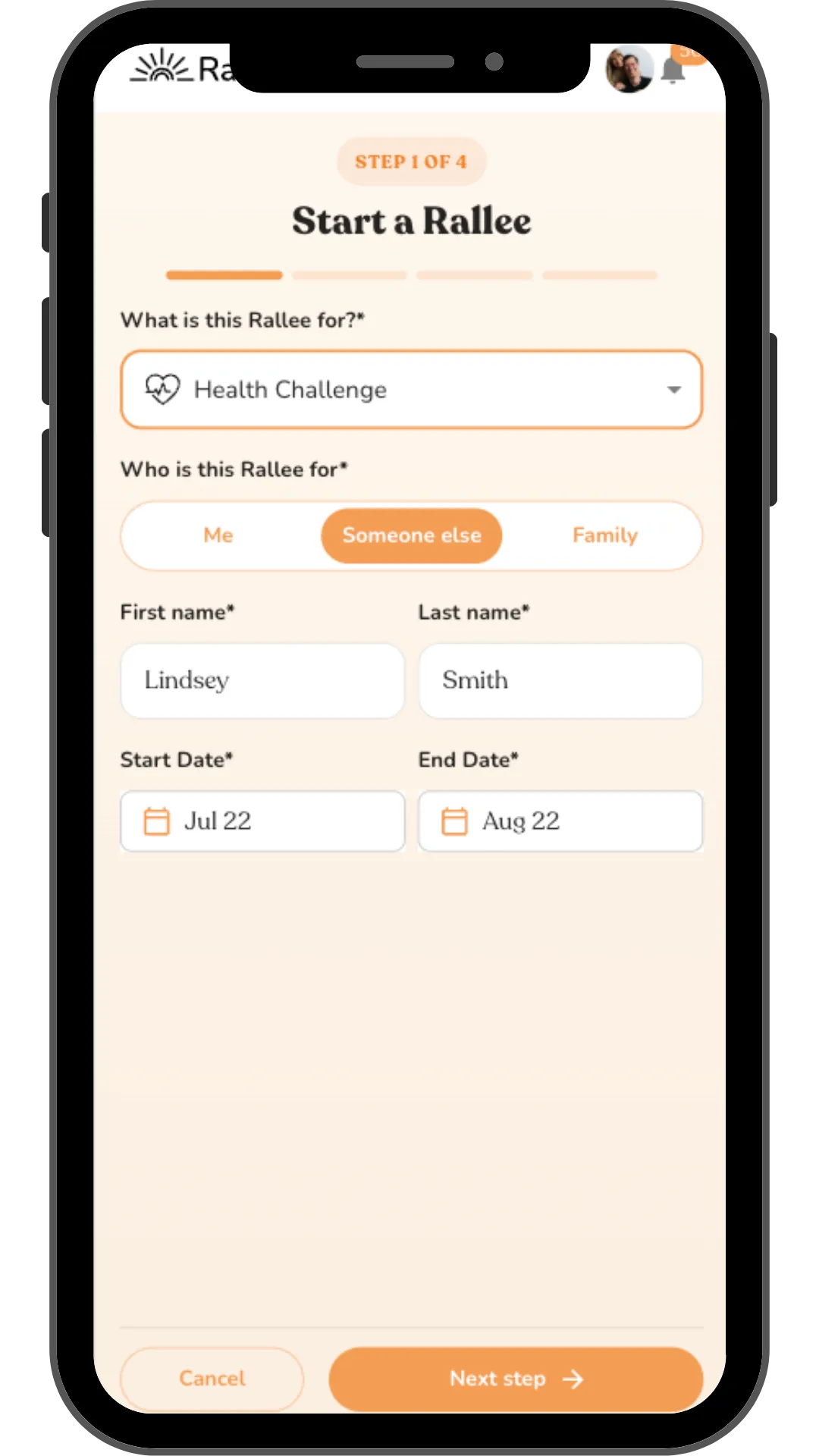
Step 1
Share who the meal train is for.
Pick what the meal train is for (a new baby, surgery, illness, or loss), then add the recipient's name and the date range you want meals covered.
Works for any occasion: babies, surgery, grief, illness
Set a start and end date in seconds
Organize it for yourself, a friend, or a family
Step 2
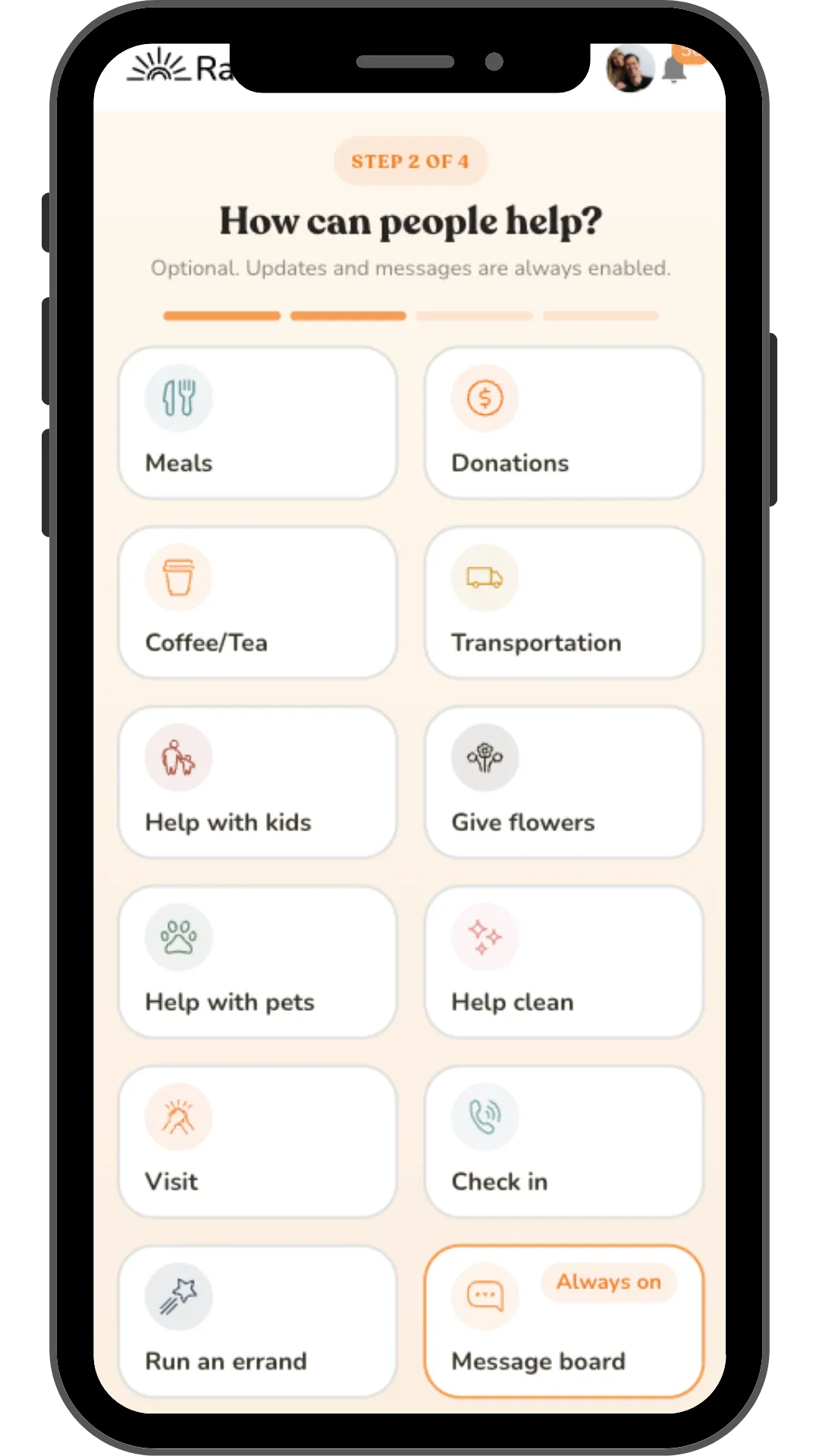
Choose how people can help, not just meals.
A meal train doesn't have to stop at food. You have the option to turn on meals, add donations, coffee runs, help with kids or pets, house cleaning, visits, or errands. Message updates are always on, so everyone stays in the loop.
Meals is the core of every meal train
Add donations, transportation, or errands with one tap
A shared message board keeps friends and family updated
Step 3
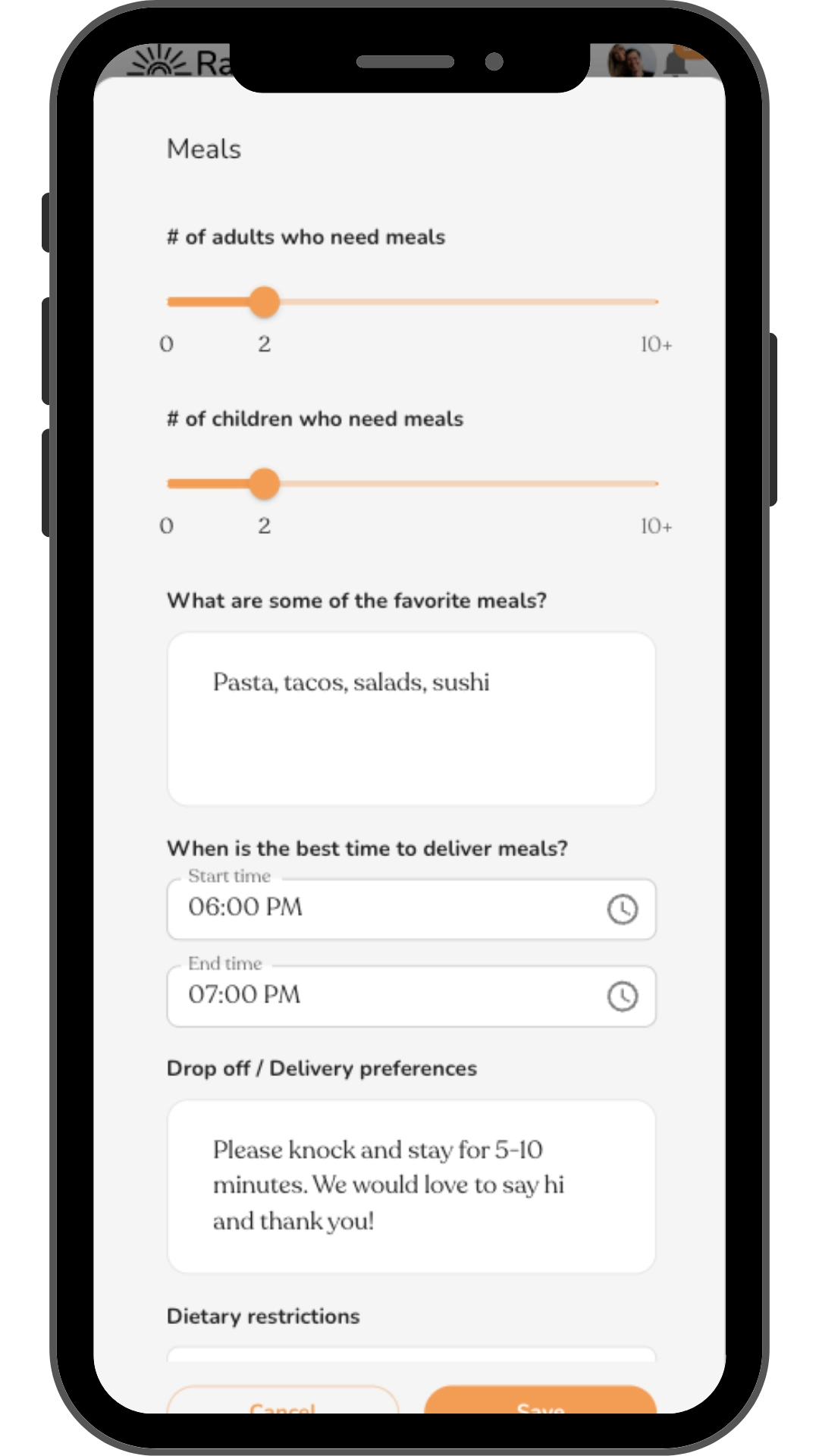
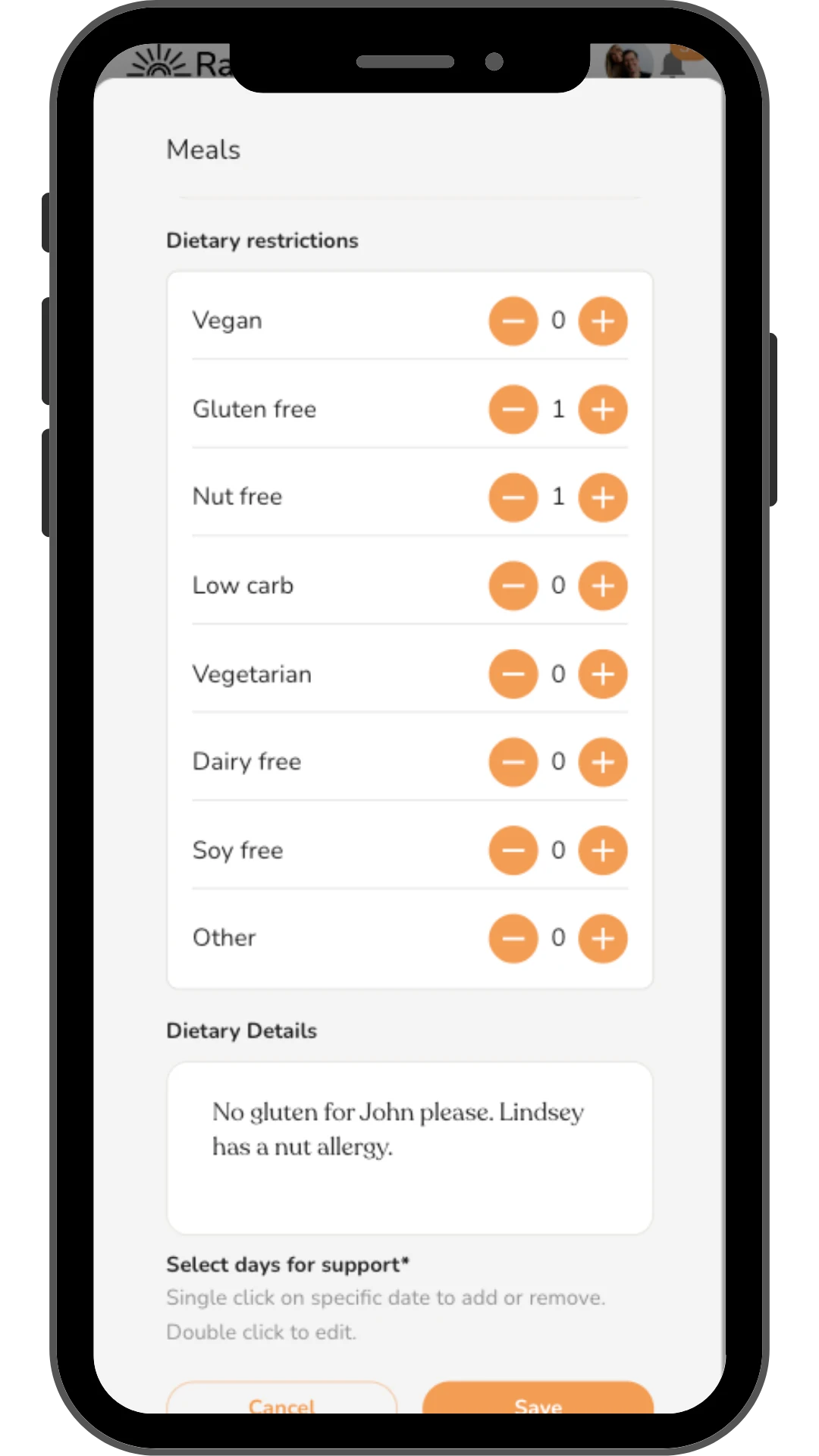
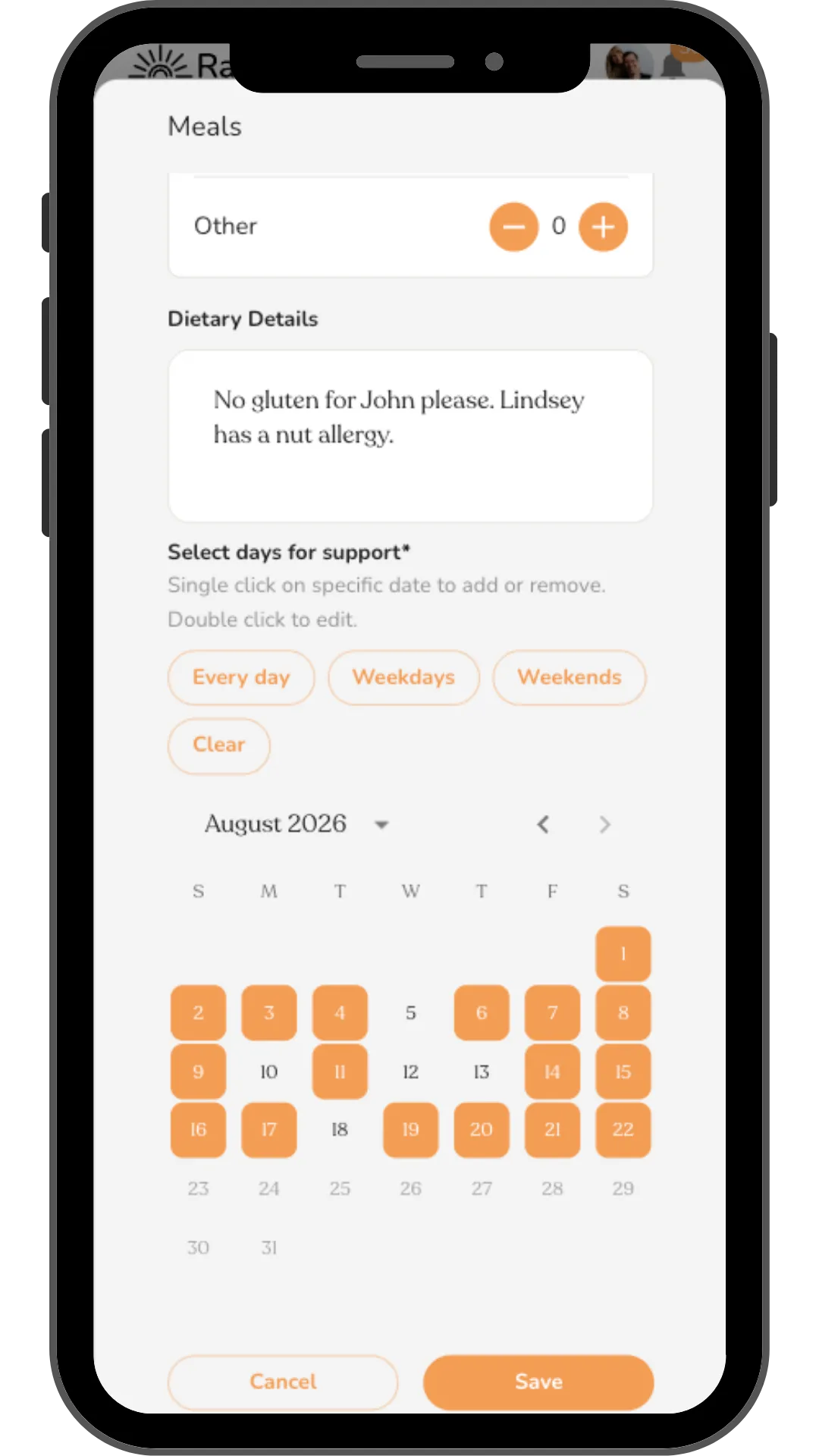
Add meal details, dietary needs, and delivery days.
Add optional details including how many adults and kids need meals, favorite dishes, delivery windows, dietary restrictions, and dates.
Favorite meals, preferred timing, drop-off notes
Vegan, gluten-free, nut-free, and other dietary flags
Tap 'Every day', 'Weekdays', 'Weekends', or pick dates by hand. Add optional comments to specific dates.
Step 4
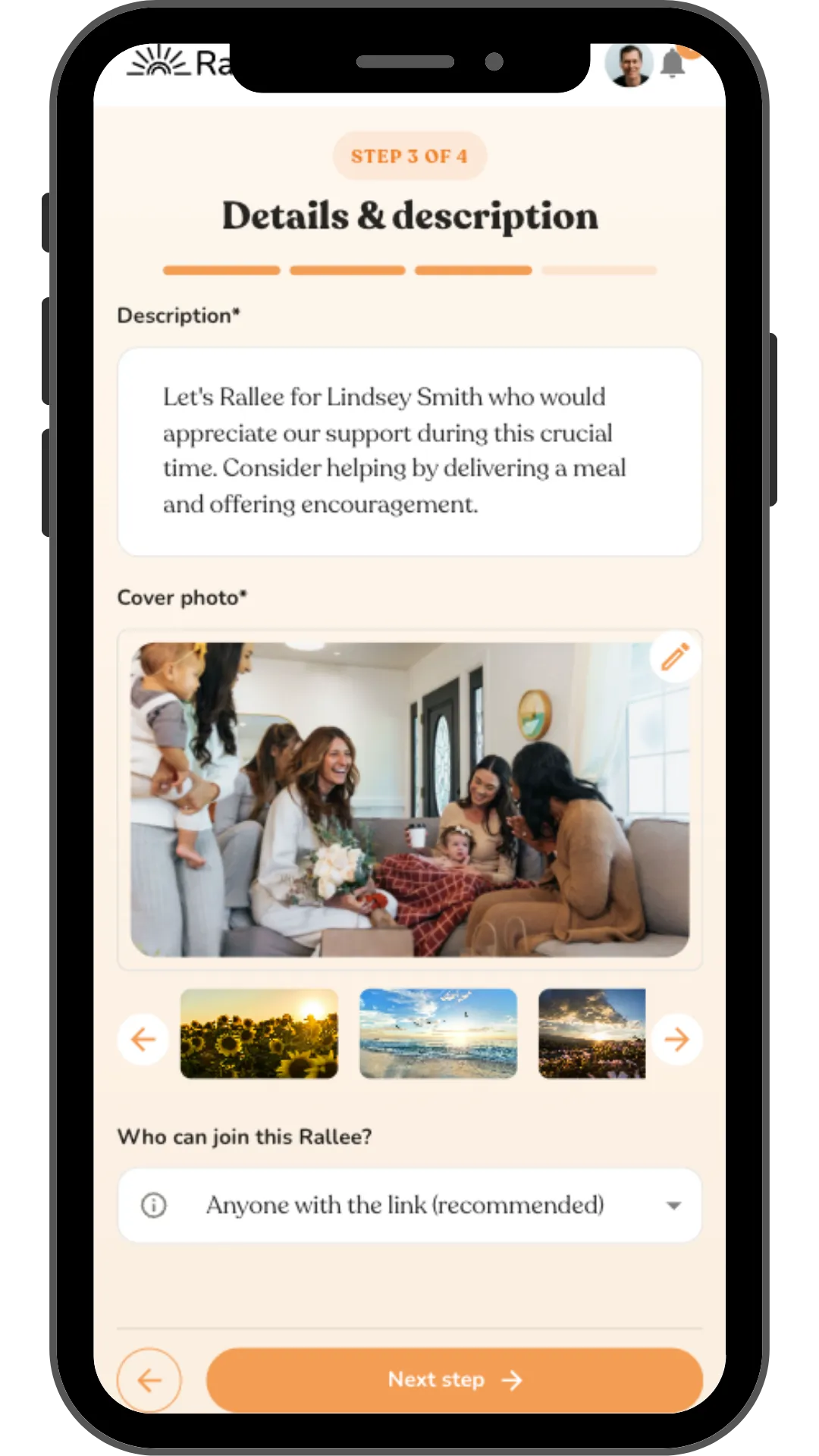
Write a description and add a cover photo.
Add a short description or use the one we add for you. Add a cover photo, decide who can join with a link, and you're nearly done setting up your meal train.
A description template you can edit in seconds
Upload a photo or pick from one of our ready-to-use images.
Control who can join.
Step 5
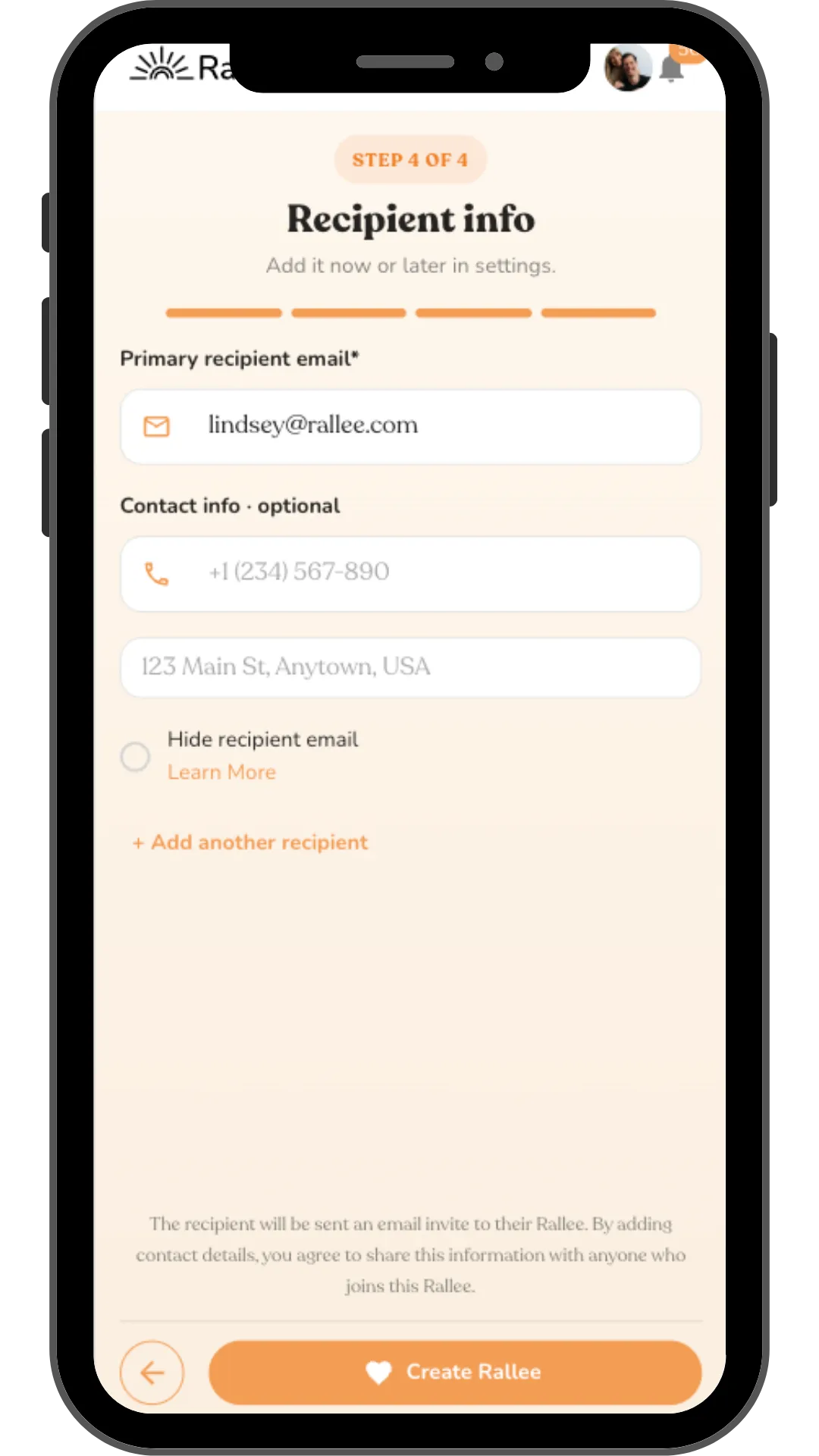
Add the recipient's info.
Enter the recipient's email now or after you have created the Rallee. Add their phone number and address (optional) so volunteers know where to deliver meals. Add more than one recipient if needed, then create your meal train.
Recipient gets an email invite automatically
Optional address so meal deliveries land at the right door
Contact info is only shown to people in the Rallee. You can hide the email and opt out of adding a phone number and address.
Step 6
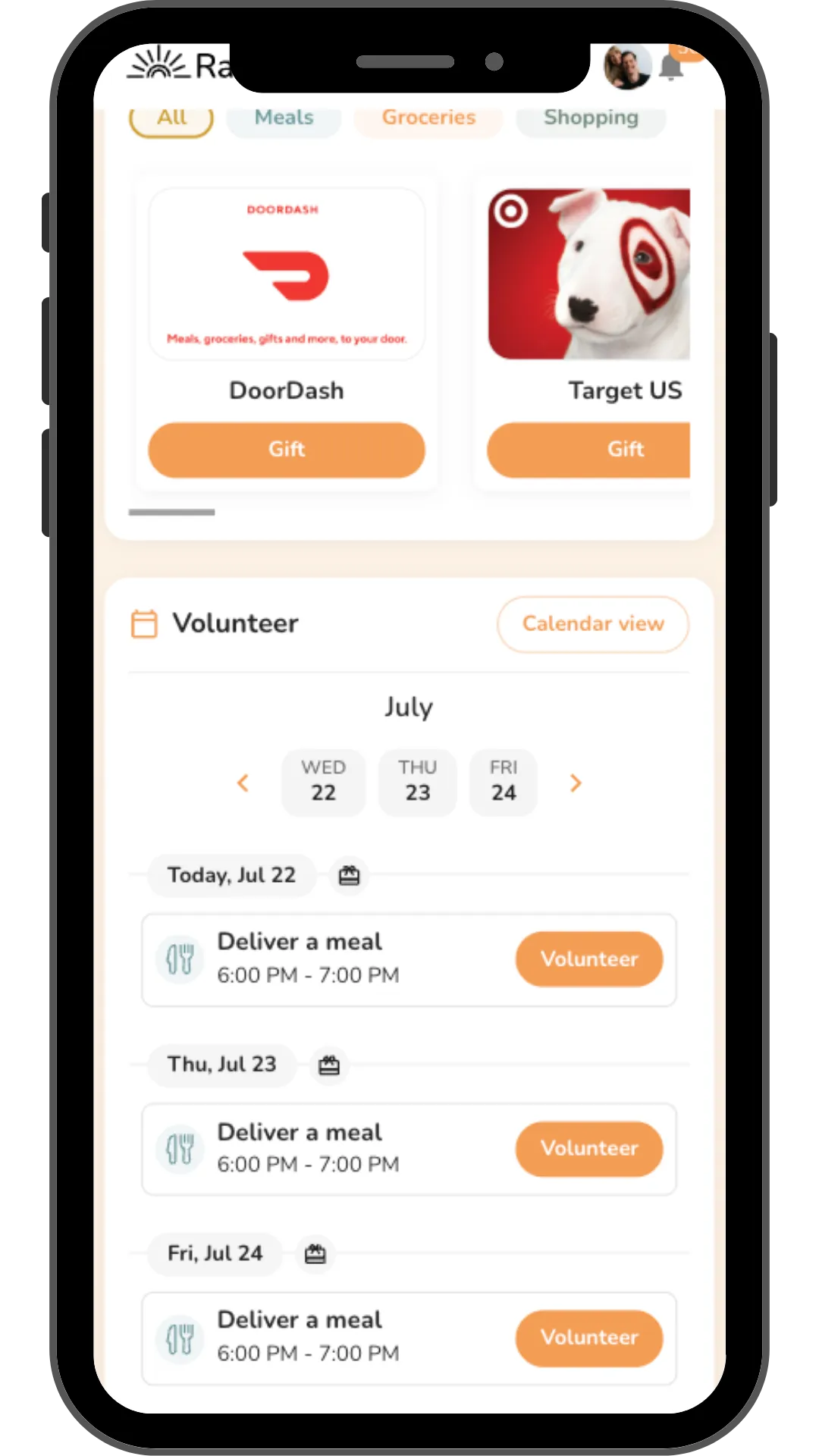
Watch the meal train fill up.
Your meal train is live. Friends and family claim delivery days right on the calendar, no sign-up sheet, no reply-all email chain, just a schedule that fills itself in.
Guests claim a day and time with a single tap
Participants can give gift cards for DoorDash, GrubHub, Starbucks or hundreds of other retailers.
Everyone gets a gentle reminder before their day
Step 7
Invite friends and family to help.
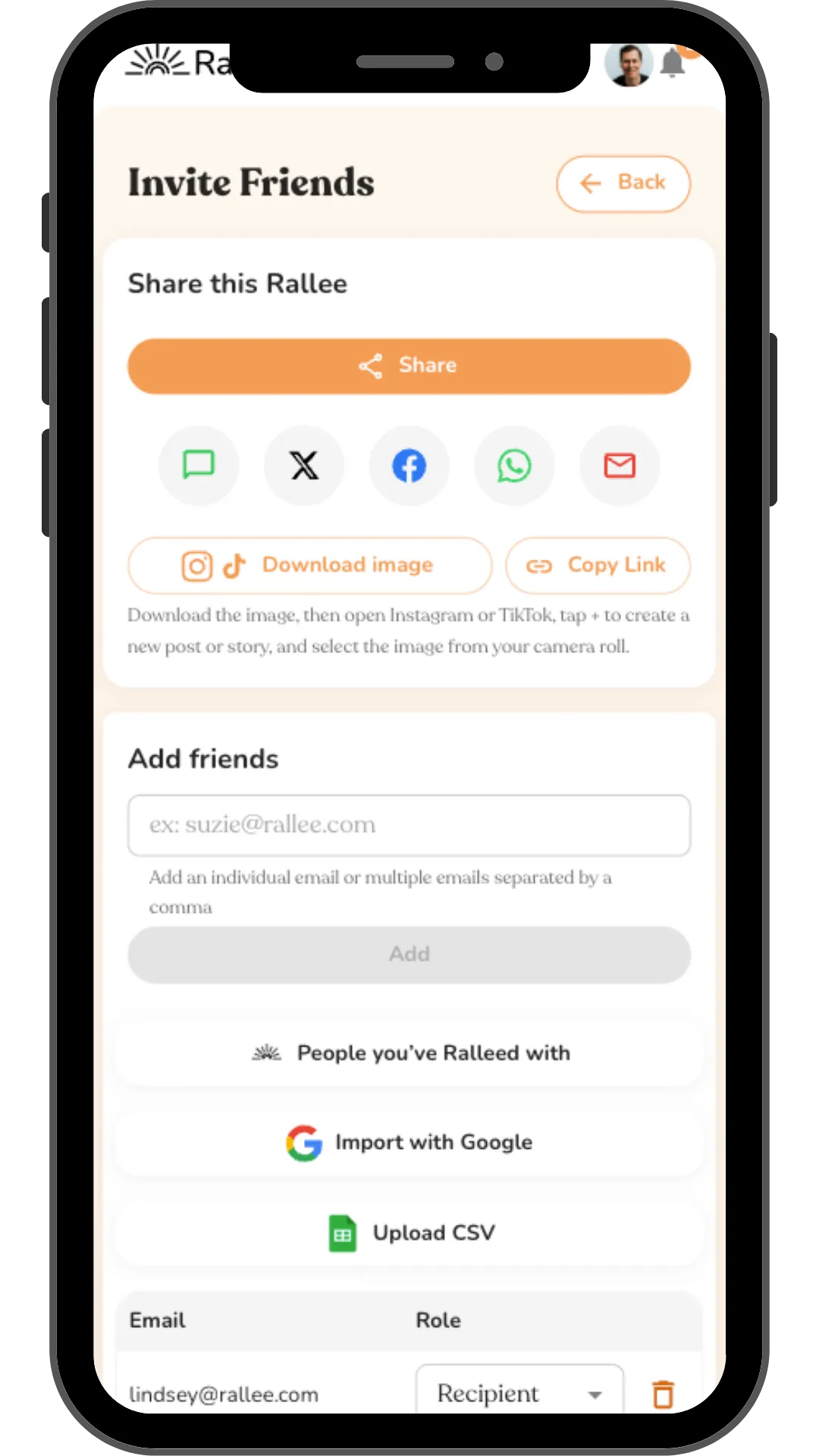
Share your meal train with one tap over text, email, or social, or add people directly by email. Import contacts from Google, upload a CSV, or pull in people you've Ralleed with before.
Share the meal train via text, email, or on social media in one tap
Add friends by email, one at a time or all at once
Import from Google, a CSV, or add people you've Ralleed with before
Ways to help
A meal train that doesn't stop at meals
Meals are the heart of it. Rallee also has 16 support types, plus custom support for whatever you need, all free and all optional:
Share updates
Deliver a meal
Donate
Give coffee/tea
Give a gift
Provide transportation
Help with kids
Give flowers
Help with pets
Help clean
Visit
Check in
Run an errand
Unlimited custom support
- Meal calendar
Friends claim a day with one tap.
- Meal details
Favorites, delivery window and drop-off notes.
- Dietary needs
Set once. Every volunteer sees them.
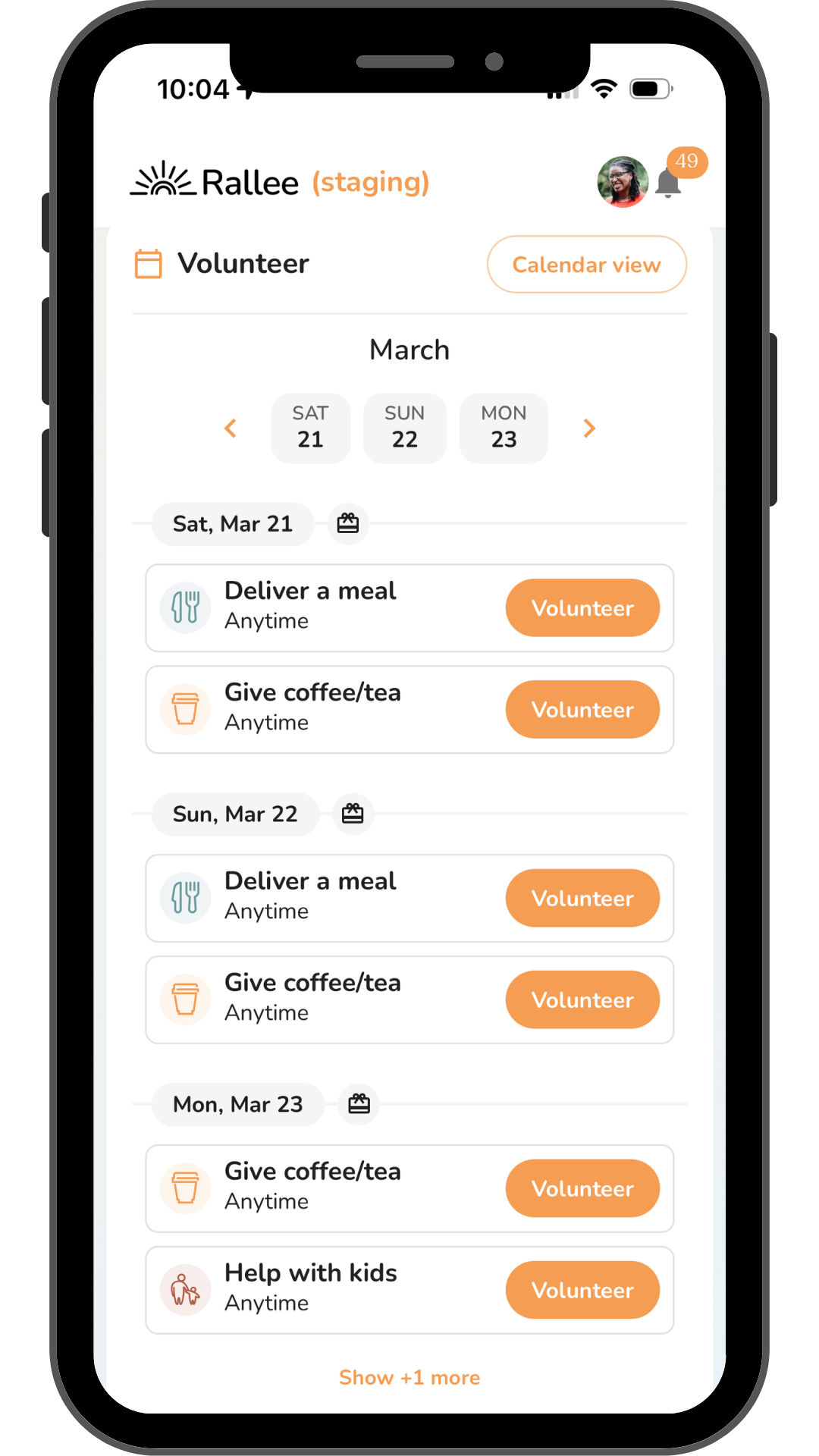 Beyond meals
Coffee, rides and kids, no upgrade needed.
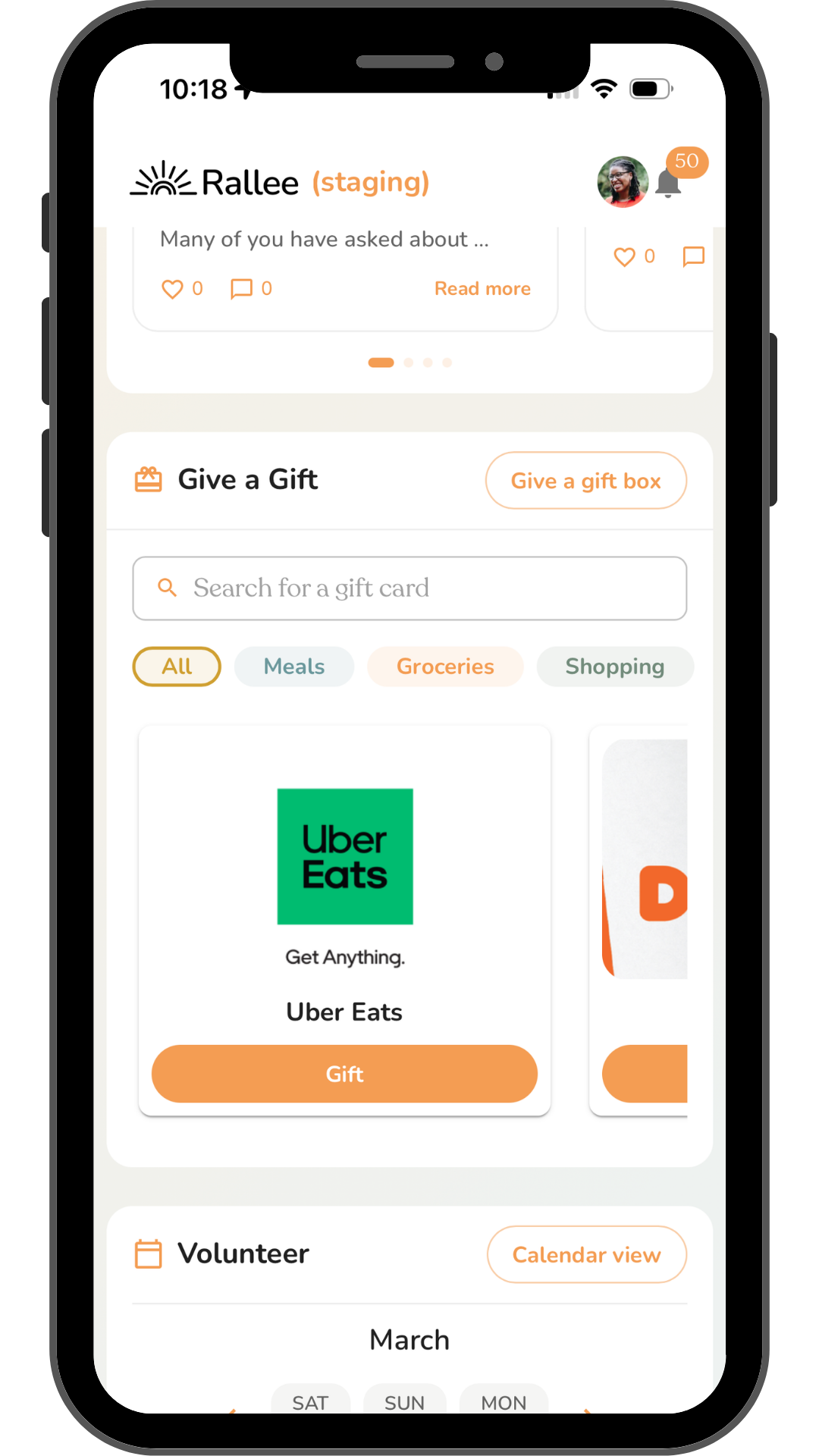 Gift cards
Bought on the page, not on another site.
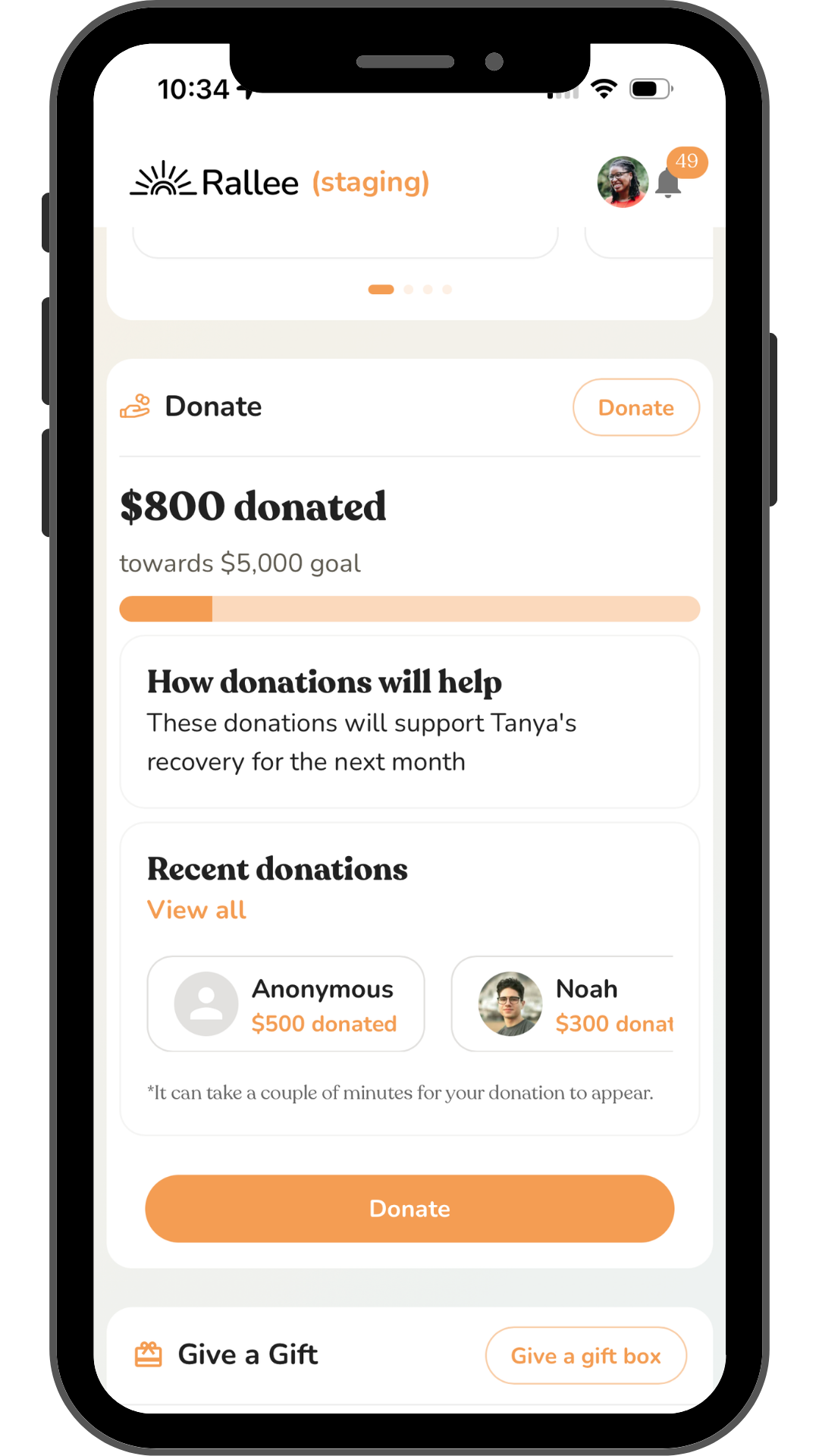 Donations
No Rallee platform fee.
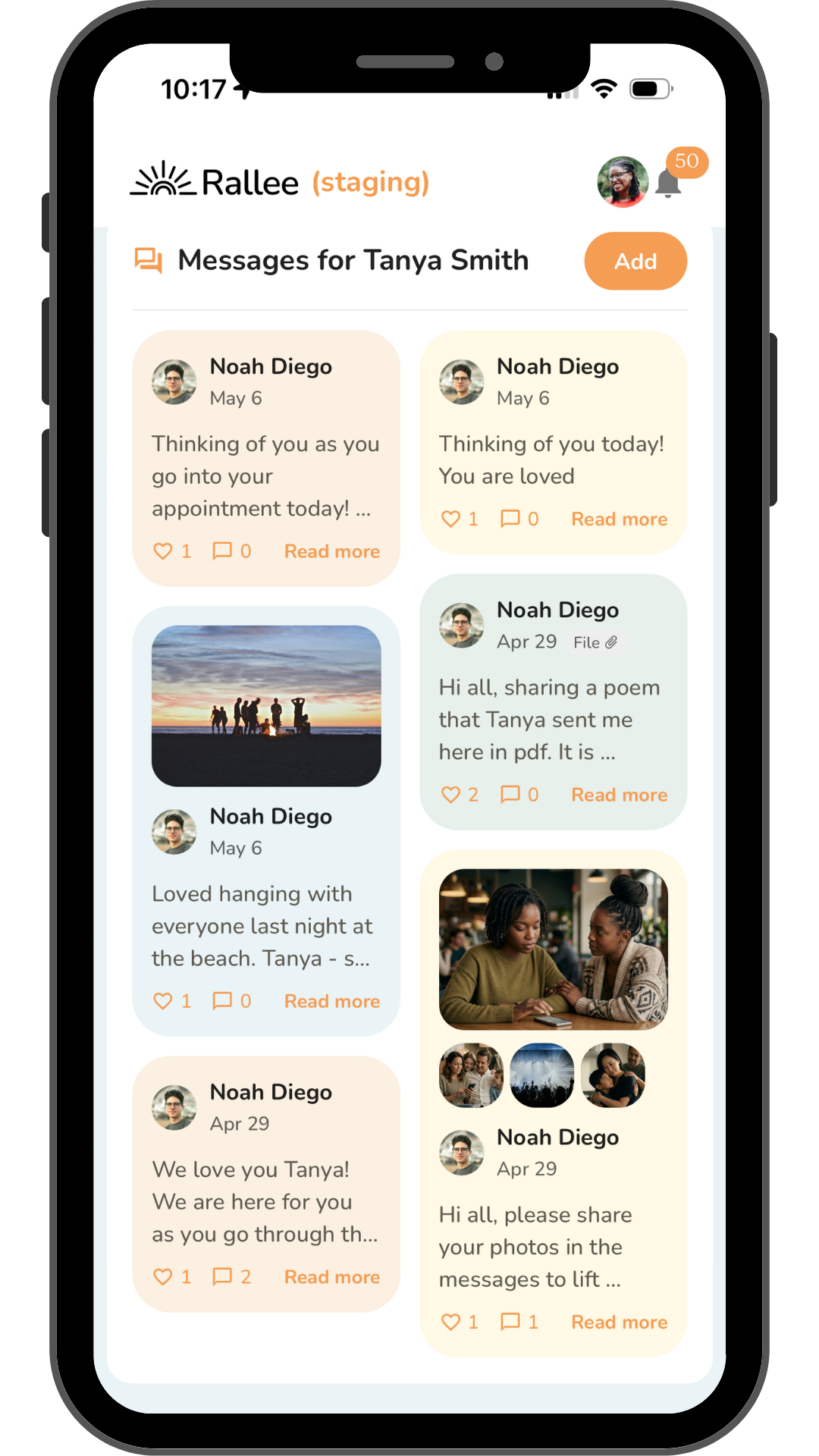 Messages
Thank-yous and encouragement in one place.
Supporting someone through chemo? See our guide to a meal train for cancer patients.
Moving over
How to move a meal train that has already started
You can move a meal train that has already started. Leave the old page up so nobody loses the link, set the new one up for the dates that are not covered yet, and tell people once. Anyone already signed up on the old calendar can keep that slot.
- What about people already signed up?
- Leave those dates on the old calendar and start the new one from the first uncovered day. Nobody has to re-enter anything, and nobody gets a double booking.
- Can I move the sign-ups across?
- Not automatically. We cannot import a MealTrain calendar, and we are not going to suggest you retype it. Most people run the two side by side for a week and then let the old one lapse.
- Do I have to pay to unlock anything?
- No. Multiple sign-ups a day, rides, errands and childcare are all included free. MealTrain keeps those behind a one-time $10 upgrade.
- What happens to donations?
- Anything already raised stays with MealTrain's payout. New donations on Rallee go to your recipient with no Rallee platform fee, only Stripe's 2.9% + $0.30.
I've moved the meal train for [Name] to a new page. [link] If you already signed up for a date, you're all set, nothing changes. New dates are on the new page. There's also space there for rides and errands if that's easier for you than cooking.
Copy it, add your link, and send it by text, WhatsApp, Facebook or email.
“My friends gave meals, brought coffee, and even signed up for baby snuggles so I could nap. Every act of kindness reminded me how loved and supported we are.”
FAQ
Meal train apps: common questions
Rallee is the best free meal train app for most families. Its meal calendar takes more than one sign-up a day, and the same page can also cover rides, errands, gift cards, updates and donations, with 16 support types, plus custom support for whatever you need. There are no ads and no premium tier. Take Them A Meal is the simplest free option if you only need a meal schedule, and a classic MealTrain page is free with one volunteer per day.
The main meal train sites are Rallee, MealTrain and Take Them A Meal. All three let friends sign up to bring a meal on a specific date. Rallee adds rides, errands, gift cards and donations for free. MealTrain charges a one-time $10 upgrade for more than one activity a day and help beyond meals. Take Them A Meal is only for meals.
The top free MealTrain alternative is Rallee. It has a free meal calendar that takes more than one sign-up a day, plus rides, errands, gift cards, updates and donations, with 16 support types, plus custom support for whatever you need. Take Them A Meal is the simplest option if you only need a meal schedule.
Both have a volunteer meal calendar. A free MealTrain page allows one volunteer per day, and MealTrain Plus, a one-time $10 upgrade, adds multiple activities per day and help beyond meals. Rallee includes both for free, with 16 support types, plus custom support for whatever you need. MealTrain donations carry a 7.9% + $0.30 platform and processing fee. Rallee's platform fee is 0%, so the only cost is Stripe's 2.9% plus $0.30.
A classic MealTrain page is free and allows one volunteer per day. MealTrain Plus is a one-time $10 upgrade that adds multiple activities per day and support beyond meals. Donations carry a 7.9% + $0.30 platform and processing fee. Rallee is free with no upgrade tier, and donations carry no Rallee platform fee, only Stripe's 2.9% plus $0.30 processing fee.
Yes. Supporters pick a date and sign up to bring a meal, and every volunteer sees the delivery window, drop-off notes and dietary needs you set once. More than one person can sign up for the same day. The meal calendar is one of 16 support types, plus custom support for whatever you need, and all of it is free.
Yes. Start a free meal train on Rallee in under 1 minute, with no credit card and no premium tier. Add your friend's details, turn on the meal calendar, invite your community, and you're done. You can also add donations, rides, errands and more at no cost.
On Rallee it takes under 1 minute. Create a Rallee for your friend, turn on the meal calendar, set the dates and any dietary needs, and share the link with friends and family. Supporters pick a date and sign up to bring a meal. For the full walkthrough, see our guide on how to start a meal train.
Yes. Rallee shows no ads, anywhere, and has no paid tier. Take Them A Meal is also ad-free.
Take Them A Meal is free, has no ads, and focuses on meal schedules, and people bringing a meal there don't need an account. Rallee has the same kind of free meal calendar and adds rides, errands, gift cards, donations, updates and a message board, with 16 support types, plus custom support for whatever you need. On Rallee, supporters sign in before confirming a slot, so the family knows who is coming.
You can. SignUpGenius is a general-purpose sign-up tool, and a meal schedule is one of the things it can do. Rallee is built around one person or family you're supporting: meal sign-ups sit next to rides, errands, gift cards, updates and messages, on a free page that isn't indexed by search engines.
Yes. People use Rallee for surgery recovery, cancer treatment, a new baby, a death in the family, a move, and any time a community wants to help. It coordinates meals and every other kind of help on one page.
Start a free meal train on Rallee, set the dates you need covered, and share the link. Friends and family sign up for specific dates, so there are no group texts or spreadsheets to keep track of. Setup takes under 1 minute. If your friend is going through cancer treatment, our guide to a meal train for cancer patients covers timing meals around chemo.
Keep reading
More resources
 How to set up a meal trainStep by step, with what to include, an invite you can copy, and how long a meal train should last.
 Meal train for cancer patientsWhat to bring on each day of a chemo cycle, food safety, and how to keep meals coming for months.
 Meal train for new parentsWhat to bring a new mom in the first six weeks, one-handed and freezer meal ideas, and help beyond food.
 The best CaringBridge alternatives, comparedHealth updates plus practical help on one page, and where donations go on each site.
 The best Lotsa Helping Hands alternatives, comparedCare calendars for meals, rides and tasks, with updates, gift cards and donations.
 The best GoFundMe alternatives, comparedFees, payouts and privacy on six fundraising sites, and how to collect meals and rides beside the donations.
Free, no ads
Start a meal train today.
Set it up in under 1 minute, share one link, and let friends pick the days they can help.
Start a free meal trainBy Kevin Holst, Co-Founder, Rallee · Published · Updated
How we compared these tools. Every claim in the table was checked against the provider's own website on September 17, 2026, and every source is linked below.
We did not test how each tool feels to use, and we have not verified whether every provider has native mobile apps, so neither is in the table. Where we could not confirm something against a first-party source, we left it out rather than guessing.
If you find something here that is wrong or out of date, tell us and we will fix it.
Sources (7)
- MealTrain — “MealTrain.com does not actually sell gift cards. The buttons on MealTrain.com take participants to partner companies”
- MealTrain — “a standard 7.9% + $0.30 platform and processing fee”
- MealTrain Plus — the $10 upgrade, and what a free classic page includes
- Take Them A Meal — free, no ads, meal schedules and shipped-meal gift cards
- Give InKind — care calendar, wishlists, gift card wallet, connected fundraising
- SupportNow — fees
- Lotsa Helping Hands — care calendar, Well Wishes, Announcements
We use cookies and local storage to enhance your experience, analyze site usage, and remember your preferences.
By clicking "Accept", you consent to our use of cookies and storage. Learn more